Public Docs
【模型量化】深度学习模型量化 & 量化理论 & 各平台的量化过程 & 硬件加速
【TVM】TI关于TVM的使用测试与分析
【LLM&LVM】大模型开源工程思维导图
SmartSip
【北航卓越工程师】《汽车前沿技术导论:智能驾驶》讲义
【工具链】Yocto使用介绍——使用Yocto创建一个树莓派的系统镜像
【工具链】使用ssh+dialog指令设定服务器指定用户仅容器访问
【推理引擎】一篇关于模型推理的详细对比与学习
【推理引擎】关于TVM中的Schedule优化详解(On going)
【LLM微调】使用litgpt进行私有数据集模型微调的测试总结
【TVM】在TVM Relay中创建一个自定义操作符
【STT+LLM+TTS】如何使用语音转文字模型+大预言模型+语音生成模型完成一个类人的语音交互机器人
【RAG】 通过RAG构建垂直领域的LLM Agent的方法探索
【RAG】GraphRAG精读与测试(On going)
【AI Agent】MetaGPT精读与学习
【AI Base】Ilya Sutskever 27篇必读论文分享清单
【Nvidia】Jetson AGX Orin/ Jetson Orin nano 硬件测试调试内容(On going)
【BI/DI】LLM Using in BI Testing Scenario (On going)
【Nvidia】How to Activate a Camera on Nvidia Platform in Details
【RAS-PI】树莓派驱动开发
【行业咨询阅读】关注实时咨询和分析
【mobileye】2024 Driving AI
【mobileye】SDS_Safety_Architecture
【yolo】yolov8测试
【nvidia】Triton server实践
【alibaba】MNN(on updating)
【OpenAI】Triton(on updating)
【CAIS】关于Compound AI Systems的思考
【Nvidia】关于Cuda+Cudnn+TensorRT推理环境
【BEV】BEVDet在各个平台上的执行效率及优化(On Updating)
【Chip】AI在芯片设计和电路设计中的应用
【Chip】ChiPFormer
【Chip】关于布线的学习
【Chip】MaskPlace论文精读与工程复现优化
【gynasium】强化学习初体验
【Cadence】X AI
【transformer】MinGPT开源工程学习
【中间件】针对apollo 10.0中关于cyberRT性能优化的深度解读和思考
【Robotics】调研了解当前机器人开发者套件(on updating)
【Robotics】ROS CON China 2024 文档技术整理与感想总结(上2024.12.7,中2024.12.8,下场外产品)
【algorithm】关于模型、数据与标注规范的平衡问题
【nvidia】DLA的学习了解与使用
【nvidia】构建nvidia嵌入式平台的交叉编译环境(其他环境平台可借鉴)
【2025AI生成式大会】2025大会个人总结
【Robotics】 Create Quadruped Robot RL FootStep Training Environment In IsaacLab
【Robotics】如何一个人较为完整的完成一个机器人系统软件算法层面的设计与开发
【VLM】读懂多模态大模型评价指标
【VLM】大模型部署的端侧部署性能与精度评估方法与分析
【Nvidia】Jetson Orin 平台VLM部署方法与指标评测
【Database】向量数据库
【SoC】性能与功耗评估
【MCP】MCP探索
【InnoFrance】一个“关于声音”的有趣项目
【Robotics】写给那些想要快速了解机器人或者具身智能的工程师们
【Robotics】open X Embodiment RT-X 数据集下载与使用和分析
文档发布于【Feng's Docs】
-
+
首页
【Robotics】open X Embodiment RT-X 数据集下载与使用和分析
# 0 数据集说明 - 数据集:https://docs.google.com/spreadsheets/d/1rPBD77tk60AEIGZrGSODwyyzs5FgCU9Uz3h-3_t2A9g/edit?gid=0#gid=0 - 下载使用,gsutil下载数据集,注意如果没有googledrive的下载工具gsutil,注意使用pip install 进行安装,不要使用apt install,并不是同一个应用,使用apt install 安装会变成另一个cli。安装完成后使用 gsutil -m cp -r gs://gresearch/robotics/[dataset_name] . 指令进行下载,关于数据集的名字,可以参考数据集汇总了表格的S列Registered Dataset Name。 - 数据集信息:数据集非常全面是目前机器人领域最大的数据集,可以统计的数据片段有2419193段,大小达到了8964.94GB。https://blog.csdn.net/OpenDataLab/article/details/134399456 - 数据集使用RLDS标准https://github.com/google-research/rlds , https://zhuanlan.zhihu.com/p/1892304095701873850 , https://research.google/blog/rlds-an-ecosystem-to-generate-share-and-use-datasets-in-reinforcement-learning/ 格式保存,兼容tensorflow,如果要使用pytorch,需要使用numpy进行转换,可视化部分的代码参见Annexe1 - 数据格式:通过构建builder并打印builder.info信息,可以看到不同的数据集都有一个标准的格式信息见Annexe2,根据表格中(joint position || EEF position || EEF velocity,camera nb)等信息,可以在FeaturesDict中找到对应的信息并可以加以分析和利用。值得注意的是,图像数据都经过裁剪和压缩,分辨率不是特别高,基本与使用的image encoder网络的输入相当,例如224*224*3, 256*320*3 等常见尺寸 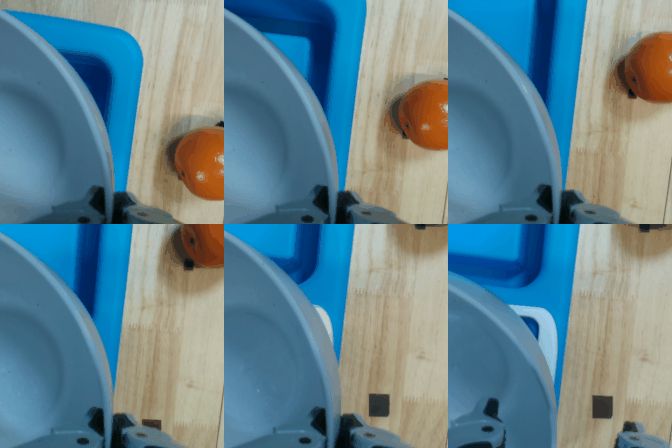 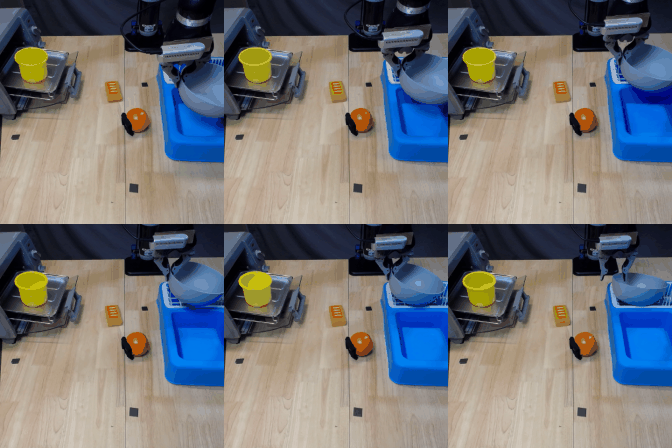 # 1 数据集使用 - 数据集均采用RLDS标准,RLDS的数据包结构定义如下 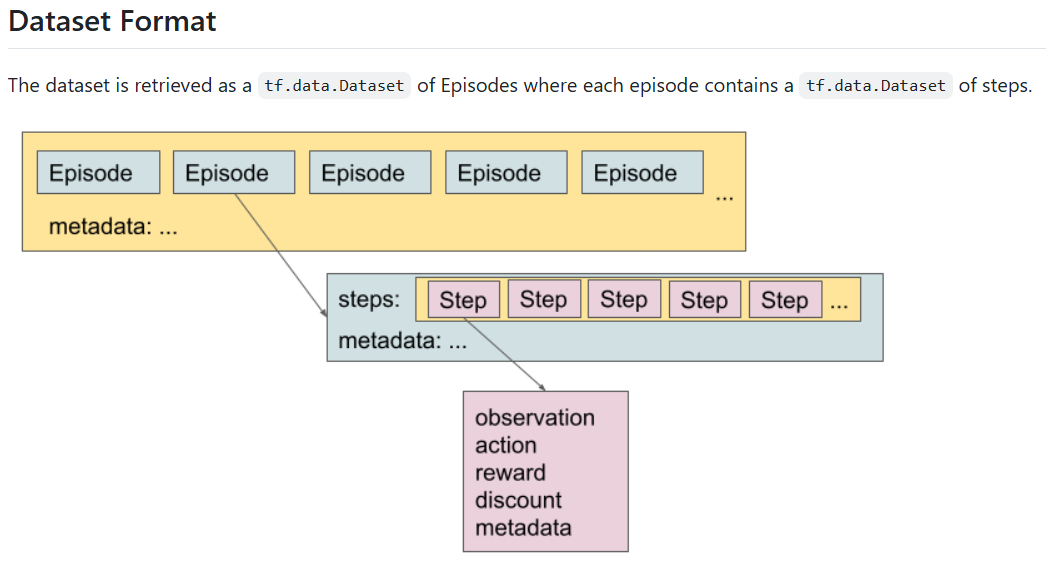 # 2 如何定义使用自己的机器人数据集方案 - 自建数据集的整体数据流程及要解决的问题如下图 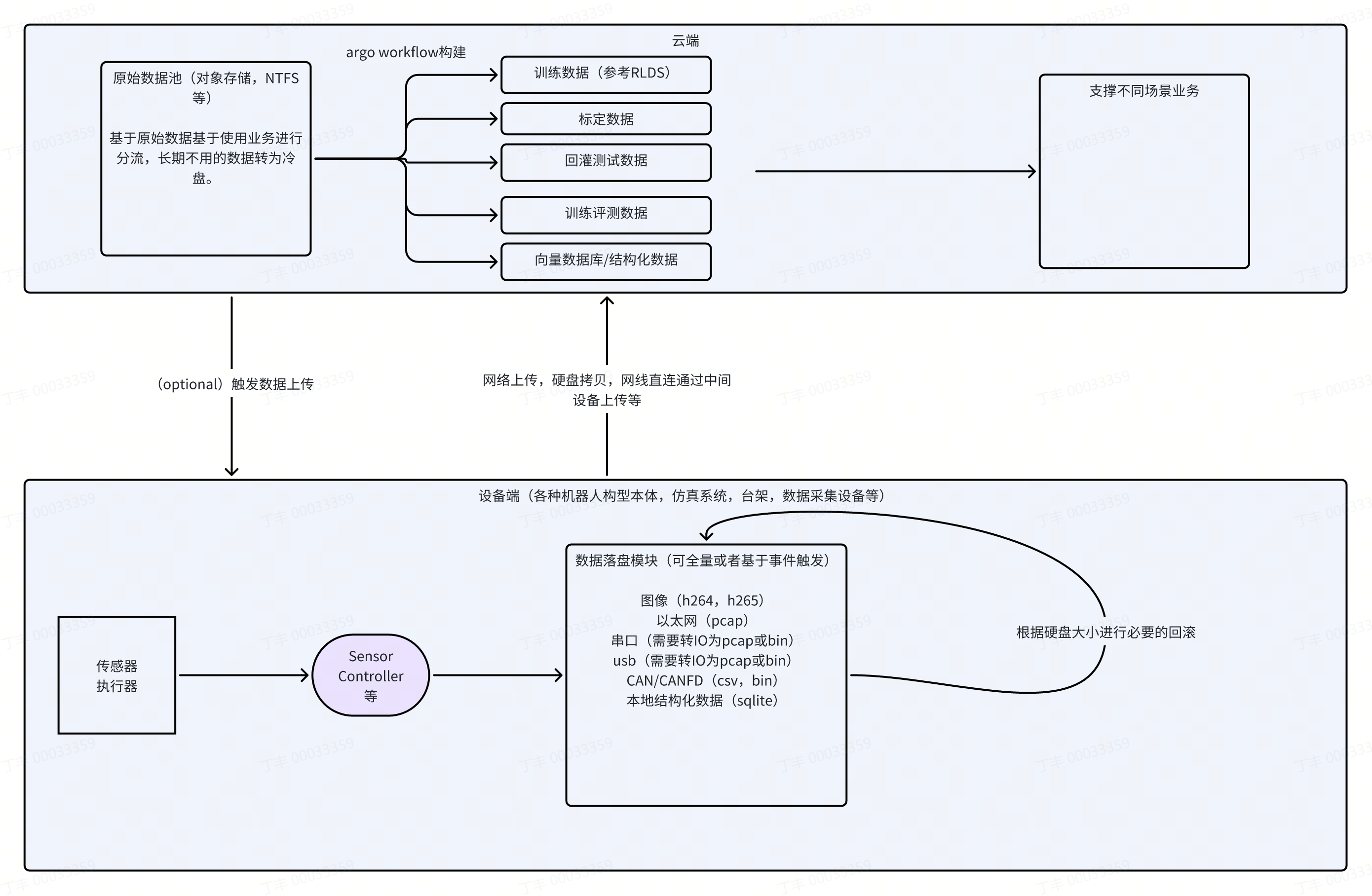 # Annexe 1. 数据可视化和分析 ``` python import numpy as np import tensorflow_datasets as tfds from PIL import Image from IPython import display import tensorflow as tf print("Num GPUs Available: ", len(tf.config.list_physical_devices('GPU'))) # images PIL list # duration ms def as_gif(images, path='temp.gif'): images[0].save(path, save_all=True, append_images=images[1:], loop=0, duration=10) gif_bytes = open(path, 'rb').read() return gif_bytes def check_key_exist(builder, display_key): if display_key not in builder.info.features['steps']['observation']: raise ValueError('Error:' + str(builder.info.features['steps']['observation'])) def save_image(builder, episode, display_key, path): check_key_exist(builder, display_key) images1 = [step['observation'][display_key] for step in episode['steps']] print('image len: ', display_key, len(images1)) images2 = [Image.fromarray(image.numpy()) for image in images1] display.Image(as_gif(images2, path)) builder = tfds.builder_from_directory(builder_dir='/home/hihonor/Datas/jaco_play/0.1.0') print(builder.info.features['steps']['observation']) print(builder.info) #ds = builder.as_dataset(split='train[:10]').shuffle(10) ds = builder.as_dataset(split='train') print('nb_episode: ', len(ds)) # episode = next(iter(ds)) episode_index = 5 episode = next(iter(ds.skip(episode_index).take(1))) save_image(builder, episode, 'image', 'image.gif') save_image(builder, episode, 'image_wrist', 'image_wrist.gif') # builder # builder.info # builder.info.features # builder.info.features['steps'] # builder.info.features['steps']['observation'] # len(builder.as_dataset(split='train[0:]')) # episode # episode['steps'] # len(images1), images1 ``` 2. 数据格式(以fractal20220817_data为例) ``` FeaturesDict({ 'base_pose_tool_reached': Tensor(shape=(7,), dtype=float32), 'gripper_closed': Tensor(shape=(1,), dtype=float32), 'gripper_closedness_commanded': Tensor(shape=(1,), dtype=float32), 'height_to_bottom': Tensor(shape=(1,), dtype=float32), 'image': Image(shape=(256, 320, 3), dtype=uint8), 'natural_language_embedding': Tensor(shape=(512,), dtype=float32), 'natural_language_instruction': string, 'orientation_box': Tensor(shape=(2, 3), dtype=float32), 'orientation_start': Tensor(shape=(4,), dtype=float32), 'robot_orientation_positions_box': Tensor(shape=(3, 3), dtype=float32), 'rotation_delta_to_go': Tensor(shape=(3,), dtype=float32), 'src_rotation': Tensor(shape=(4,), dtype=float32), 'vector_to_go': Tensor(shape=(3,), dtype=float32), 'workspace_bounds': Tensor(shape=(3, 3), dtype=float32), }) tfds.core.DatasetInfo( name='fractal20220817_data', full_name='fractal20220817_data/0.1.0', description=""" Table-top manipulation with 17 objects """, homepage='https://ai.googleblog.com/2022/12/rt-1-robotics-transformer-for-real.html', data_path='/home/hihonor/Datas/fractal20220817_data/0.1.0', file_format=tfrecord, download_size=Unknown size, dataset_size=111.07 GiB, features=FeaturesDict({ 'aspects': FeaturesDict({ 'already_success': bool, 'feasible': bool, 'has_aspects': bool, 'success': bool, 'undesirable': bool, }), 'attributes': FeaturesDict({ 'collection_mode': int64, 'collection_mode_name': string, 'data_type': int64, 'data_type_name': string, 'env': int64, 'env_name': string, 'location': int64, 'location_name': string, 'objects_family': int64, 'objects_family_name': string, 'task_family': int64, 'task_family_name': string, }), 'steps': Dataset({ 'action': FeaturesDict({ 'base_displacement_vector': Tensor(shape=(2,), dtype=float32), 'base_displacement_vertical_rotation': Tensor(shape=(1,), dtype=float32), 'gripper_closedness_action': Tensor(shape=(1,), dtype=float32), 'rotation_delta': Tensor(shape=(3,), dtype=float32), 'terminate_episode': Tensor(shape=(3,), dtype=int32), 'world_vector': Tensor(shape=(3,), dtype=float32), }), 'is_first': bool, 'is_last': bool, 'is_terminal': bool, 'observation': FeaturesDict({ 'base_pose_tool_reached': Tensor(shape=(7,), dtype=float32), 'gripper_closed': Tensor(shape=(1,), dtype=float32), 'gripper_closedness_commanded': Tensor(shape=(1,), dtype=float32), 'height_to_bottom': Tensor(shape=(1,), dtype=float32), 'image': Image(shape=(256, 320, 3), dtype=uint8), 'natural_language_embedding': Tensor(shape=(512,), dtype=float32), 'natural_language_instruction': string, 'orientation_box': Tensor(shape=(2, 3), dtype=float32), 'orientation_start': Tensor(shape=(4,), dtype=float32), 'robot_orientation_positions_box': Tensor(shape=(3, 3), dtype=float32), 'rotation_delta_to_go': Tensor(shape=(3,), dtype=float32), 'src_rotation': Tensor(shape=(4,), dtype=float32), 'vector_to_go': Tensor(shape=(3,), dtype=float32), 'workspace_bounds': Tensor(shape=(3, 3), dtype=float32), }), 'reward': Scalar(shape=(), dtype=float32), }), }), supervised_keys=None, disable_shuffling=False, splits={ 'train': <SplitInfo num_examples=87212, num_shards=1024>, }, citation="""@article{brohan2022rt, title={Rt-1: Robotics transformer for real-world control at scale}, author={Brohan, Anthony and Brown, Noah and Carbajal, Justice and Chebotar, Yevgen and Dabis, Joseph and Finn, Chelsea and Gopalakrishnan, Keerthana and Hausman, Karol and Herzog, Alex and Hsu, Jasmine and others}, journal={arXiv preprint arXiv:2212.06817}, year={2022} }""", ) nb_episode: 87212 ```
dingfeng
2026年2月28日 11:58
16
0 条评论
转发文档
收藏文档
上一篇
下一篇
评论
手机扫码
复制链接
手机扫一扫转发分享
复制链接
Markdown文件
PDF文档
PDF文档(打印)
分享
链接
类型
密码
更新密码